
Are you planning to upgrade/build your PC without spending a fortune on it? Today, I am going to share my Gaming PC build. I will be explaining about the components you should buy if you are building a Gaming PC in early 2019. A budget friendly build for around 30k can also be made by saving on some additional components like SSD and going for a lower end processor. However, it all boils down to personal choice of the user. So, without wasting more time on the basics, let's get straight into our build.

₹50,000 Gaming PC Specs:
Processor:
 Intel G5400 is a good processor capable of handling most of the current and upcoming AAA titles at Full HD. It costs just over ₹6,000. But if you want a workstation PC which should last for a couple of years then you should go with i3-8100. Intel 8th gen Coffee lake i3-8100 processor is at par with previous generation i5 processors and even outperforms a lot of them. i3-8100 has 4 cores and 4 threads which makes multitasking a breeze. Definitely worth buying if you want a strong processor around ₹10,000.
 Motherboard:

Gigabyte H310M H is the best 8th gen motherboard available under ₹5,000. It is the most budget friendly current generation motherboard in the market.

RAM:
8GB RAM is bare minimum and anything below this can not be accepted in 2019. It is recommended to go for dual channel RAM sticks(2 x 4GB) but considering that the user might want an additional RAM slot free for future upgrade, we are going with a single 8GB RAM stick. Corsair Vengeance LPX 8GB DDR4 3000Mhz is available for around ₹5,000 and is an excellent choice for this build.
Graphics Card:
 GT1030 is a good option to go for. It costs less than ₹7,000 and can handle newer games at 720p. I still recommend readers to get second hand graphic cards available on sites like olx and quikr. Getting a used GTX750Ti makes sense since you can find one easily for less than ₹4,000. It won't burn a hole in your pocket and offer better performance than a GT1030 while keeping a scope for future upgrade.
Storage:
Cabinet and PSU:
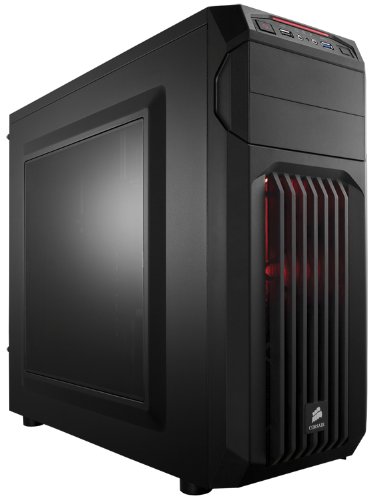 Corsair Carbide Series CC-9011050-WW Mid-Tower Steel Gaming Case and Circle 400 Watt SMPS can be brought for around ₹4,000. I never recommend saving money on SMPS Having a good gold/platinum rated SMPS ensures that the system's performance is stable. 400W is enough to power even a dedicated GPU like 1050Ti and should suffice the power needs of this build.
Accessories:
 The customization and decoration you apply to your pc, makes it YOUR PC. RGB LED strips can be used to light up your desk and the cabinet to make it look even more beautiful. Posters/Photo frames can be placed on the desk or the wall to give your setup a personal touch. You can even ditch the RGB lights for pen stand and an indoor plant. Would look great on the work desk.
 Here I am not featuring any particular keyboard or mouse because plenty of choices are available in the market and the preference of aesthetics varies heavily from person to person. However, If you wish to buy an RGB Keyboard and Mouse, then you will have to shell out a good amount of money. And that, pretty much concludes this article. I hope I helped you to decide which components to buy if you are building a PC in 2019.
Attaching a photograph of my Home PC:
- Intel Core i3-8100 @3.6GHz
- Gigabyte H310M H Motherboard
- 8GB 2400MHz Kingston HyperX DDR4 RAM
- MSI GTX 750Ti OC 2GB
- Segate Baracuda 1TB HDD
- Kingston 120 GB SSD
- Phillips 2.1 speakers
- HP Deskjet Inkadvantage WiFi Print/Scan/Copy
- Mi 3c router
- Logitech MK240 wireless combo
- Marvo Scorpion Gaming Keyboard and Dragonwar Ele-G9 Gaming Mouse
- Genuine Windows 10 Pro

Ravi Rao, Digitrovert




1 Comments
So do I need extra fans to keep the cabinet cool?
ReplyDelete